Colour Grading on Davinci Resolve
I am in no way an expert in Davinci Resolve, but knowledge is wealth that only grows when it is shared, hence, I’m sharing the things that helped me understand colour grading, and finally feel confident about my workflow.
This was my first video that I was genuinely happy with after applying everything I learned below:
Premiere Pro to Davinci Resolve.. worth the switch?
As a long time Premiere Pro user, I was honestly very hesitant. Learning new shortcuts again? New interface? Boomer mentality crept in (lol)
But this video changed everything, it basically teaches you how to make Davinci feel like Premiere Pro!
Set aside half a day (or full day) You’ll need it.
Once I got the shortcuts down, the next step was understanding how colour grading actually works inside Resolve – nodes, colour spaces, CSTs, primaries, etc.
These were the videos that helped the most:
1. Understanding Nodes + Simple Workflow
This video uses a paid LUT (“CinePrint16”), but don’t worry, you don’t need the LUT to learn from it. He explains and breaks down clearly on how each node affects the others.
🔗 https://www.youtube.com/watch?v=TzkGfDc1iMA
(Watch until “What is CinePrint16?” if you just want the fundamentals.)
2. Alternative Node Workflow + More Practical Breakdown
After understanding the basics, I moved on to this creator. Another perspective with a different workflow really helped piece things together.
3. Understanding Colour Spaces, and Advanced Workflows
When I felt ready to deepdive, this video is gold.
He explains how colour spaces work, how White Balance affects everything, and which CST settings make sense depending on your camera.
Want to practice? Here are some test footages you could use.
If you want to try colour grading, but don’t have any raw clips, I’ve uploaded a sample footage that you can experiment with!
🔗 Download sample footage here
For Fujifilm x100v, these are my settings:
CST In
Input Color Space: Rec.2020
Input Gamma: Fujifilm F-Log2
Output Color Space: DaVinci Wide Gamut
Output Gamma: DaVinci Intermediate
Tone Mapping Method: DaVinci
CST Out
Input Color Space: DaVinci Wide Gamut
Input Gamma: DaVinci Intermediate
Output Color Space: Rec.709
Output Gamma: Rec.709
☑ Apply Forward OOTF
Here is my node workflow after applying from the videos I learnt!
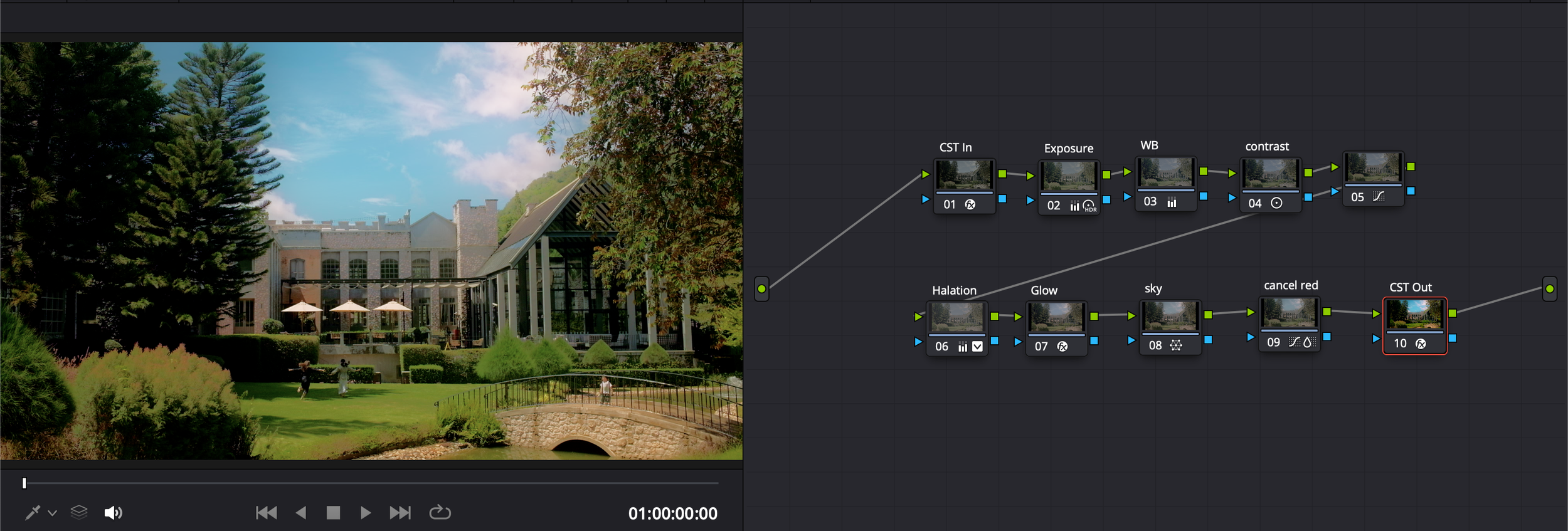
Still Figuring Out the Best Camera Space? Same.
If you happen to discover a colour-space workflow for DJI or Fujifilm, I would love to learn from your setup too!
Chat with me on instagram @faux.es